In short ⚡
The best trucking software is the platform that matches your real dispatch, billing, compliance, and visibility workflows, so you cut exceptions and speed up POD-to-invoice, not just add features.
Prioritize tools that your team can adopt quickly, integrate with ELD and accounting, and automate core processes like routing, document capture, and accessorial billing.
We hope you’ll find this article genuinely useful, but remember, if you ever feel lost at any step, whether it’s finding a supplier, validating quality, managing international shipping or customs, DocShipper can handle it all for you!
How to define the “best trucking software” for your type of fleet
The best trucking software isn’t a trophy you win, it’s the platform that matches how you dispatch, bill, stay compliant, and keep trucks moving without drama.
Here’s the thing, if your fleet reality is “texts, spreadsheets, and late-night calls,” you’ll notice fast that the “best” tool on paper can still slow you down in the yard.
From experience at DocShipper, the fleets that choose well start by mapping their real workflows, not the ones they wish they had.
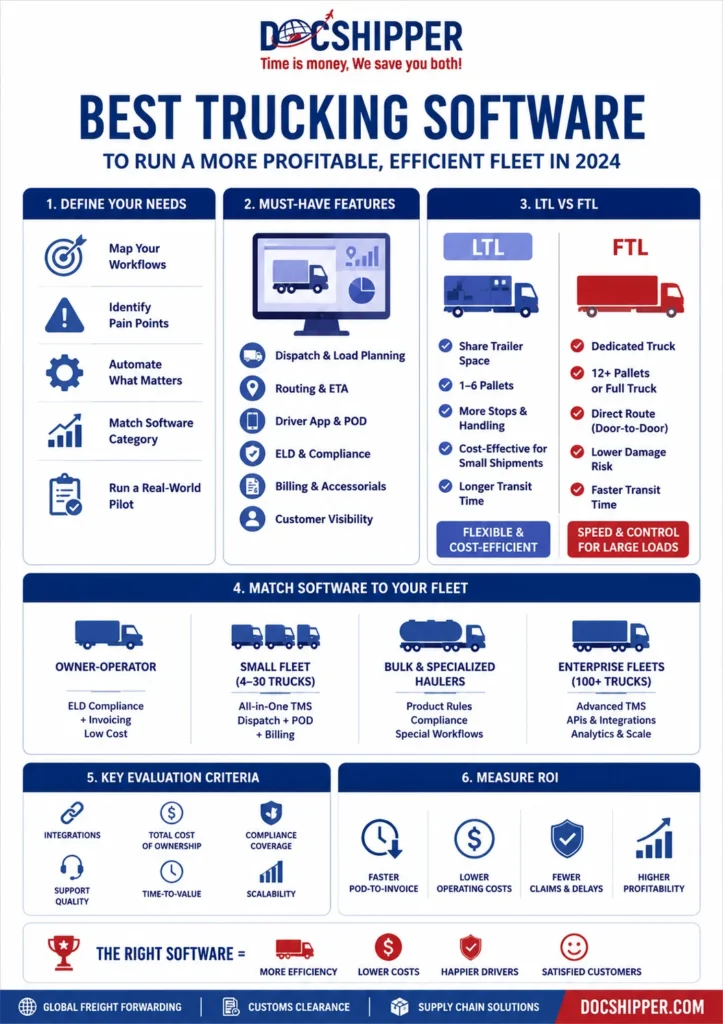
Quick workflow to define your “best” fit (step by step):
1) List your daily decisions, dispatch, route changes, POD, invoicing, compliance checks.
2) Mark what breaks most often, missed updates, detention disputes, late billing.
3) Decide what must be automated first, then what can wait 90 days.
4) Match those needs to a trucking platform category, TMS, fleet management, ELD-first, or all-in-one.
5) Validate with a 2-week pilot using real loads, not a demo script.
Checklist, define “best trucking software” for your operation:
- Dispatch speed: can you build a load, assign a driver, and confirm the plan in under 2 minutes?
- Visibility: do you get real-time status updates without chasing drivers?
- Compliance coverage: ELD, DVIR, IFTA, drug and alcohol, document retention.
- Billing discipline: clean rate confirmations, accessorials, POD to invoice in one flow.
- Exception handling: detention, layover, lumper fees, rejected freight, claims.
DocShipper Advice
We can help you audit your workflow and identify the right-fit platform for your fleet profile.
Core features you can’t skip: from dispatch and routing to compliance and billing
If you’re hunting for the best trucking software, start with the boring stuff, because boring is where margins hide.
We’ve seen fleets lose money simply because PODs lived in someone’s camera roll until Friday.
A quick real-world scenario:
You deliver on Tuesday, the receiver signs, but the POD never makes it into the system.
On Thursday, your customer disputes the delivery time, and your invoice slips a full billing cycle, cash flow takes the hit, not your “on-time %.”
Minimum feature set to insist on in any trucking management system:
- Dispatch + load planning: drag-and-drop scheduling, driver availability, equipment matching.
- Routing + ETA logic: route optimization, geofencing, exception alerts.
- Driver app: job details, messaging, document capture, POD, incident reporting.
- ELD and compliance: HOS, DVIR, inspection records, audit-ready logs, aligned with FMCSA expectations.
- Billing and settlements: invoice generation, accessorials, quick-pay tracking, driver pay calculations.
- Customer portal: track-and-trace, document downloads, proactive notifications.
- Claims and exceptions: damage notes, photo evidence, timestamped events.
What you’ll want to confirm during a demo (fast test):
- Create a load, add 3 stops, and change the appointment time mid-run.
- Capture POD from the driver app, then generate the invoice in the same thread.
- Apply detention and see if it flows into billing without manual re-entry.
DocShipper Alert
Secure your POD-to-invoice process with tools that automate capture, timestamps, and accessorial billing.
Matching software categories to fleets: owner‑operators, small fleets, bulk haulers, and enterprises

The best trucking software for you depends on your fleet profile, not your ambition.
A one-truck owner-operator and a 400-truck enterprise both “need dispatch,” but they don’t need the same level of governance, controls, or integrations.
Anecdote you’ll recognize:
We once watched a small fleet buy an enterprise TMS “to grow into it,” then spend weeks fighting user permissions and training instead of booking profitable lanes.
They didn’t need more features, they needed fewer clicks.
Common categories you’ll see in best trucking software shortlists:
- ELD-first platforms: great compliance backbone, lighter dispatch and billing.
- Fleet management suites: maintenance, fuel, safety, basic dispatch.
- TMS (Transportation Management System): dispatch, planning, billing, customer visibility.
- Enterprise TMS + integrations: multi-branch, role-based controls, API ecosystem, advanced reporting.
- Vertical-specific tools: bulk/liquids, hazmat, temperature-controlled, drayage.
Simple matching table, pick the right “best trucking software” category:
| Your fleet type | Best-fit software category | Why it usually wins |
| Owner-operator (1 to 3 trucks) | ELD-first or lightweight TMS | Low admin time, quick compliance, fast invoicing |
| Small fleet (4 to 30 trucks) | All-in-one TMS + driver app | Dispatch + POD + billing in one flow, fewer tools to maintain |
| Bulk haulers (tank, hazmat, specialized) | Vertical-specific platform or configurable TMS | Special compliance fields, product rules, incident workflows |
| Enterprise (multi-terminal, 100+ trucks) | Enterprise TMS with APIs | Governance, integrations, advanced analytics, scalability |
Checklist, pick your category in 5 minutes:
- If you’re drowning in paperwork, start with compliance and document capture.
- If dispatch feels like air traffic control, prioritize planning, routing, and alerts.
- If cash flow is tight, prioritize POD-to-invoice speed and accessorial automation.
- If customers demand visibility, prioritize portals and track-and-trace.
DocShipper Info
Get a tailored software shortlist aligned with your operational complexity and growth plans.
Key criteria to compare trucking software before you buy
Once you’ve defined what “best” means, comparing the best trucking software options gets brutally practical.
You’re not buying features, you’re buying adoption, uptime, and fewer exceptions per load.
Step-by-step comparison workflow you can actually run:
1) Shortlist 3 to 5 trucking software platforms that fit your category.
2) Build one test lane with real constraints, appointments, accessorials, and a picky customer.
3) Score each platform with the same rubric, then call references in your niche.
4) Ask for full pricing, base fees, per-truck, per-user, add-ons, onboarding, support tiers.
5) Run a pilot with two dispatchers and two drivers, then measure cycle time from POD to invoice.
Checklist, compare before you sign:
- Time-to-value: can you go live in weeks, not quarters?
- Training load: will drivers actually use it on day 1?
- Integration reality: accounting, fuel cards, GPS, ELD, EDI, APIs.
- Support quality: response time, implementation manager, escalation path.
- Contract traps: auto-renewals, seat minimums, paid “mandatory” add-ons.
DocShipper Advice
Request a structured comparison framework to avoid costly contract traps.
Evaluating usability, implementation, integrations, and total cost of ownership
The best trucking software looks clean in a demo, then your dispatcher tries it at 4:45 pm with three late trucks and a driver who won’t answer.
That’s where usability becomes profit, or pain.
A scenario we’ve seen too often:
You pick a platform with powerful features, but every workflow requires five screens and two approvals.
Dispatchers revert to texting, and you end up paying for shelfware plus overtime.
What to evaluate (and how to pressure-test it):
- Usability: ask a dispatcher to build and modify a multi-stop load live.
- Implementation: confirm data migration, template setup, user roles, and go-live plan.
- Integrations: accounting (QuickBooks, Netsuite), ELD, GPS, telematics, EDI, customer portals.
- Total cost of ownership: licenses, devices, onboarding, training time, support, customization.
Comparison table, what “cost” really means:
| Cost area | What vendors quote | What you should also count |
| Licensing | Per truck, per user, per month | Add-ons for reporting, customer portal, EDI, extra admin seats |
| Onboarding | One-time implementation fee | Internal time, dispatch downtime, driver training days |
| Hardware | Optional tablets or devices | Replacements, mobile data plans, mounts, accessories |
| Support | Standard support included | Paid premium tiers, after-hours response, dedicated CSM |
Authority tip you can use in procurement:
If your compliance stack touches ELD and HOS, align your evaluation with what auditors expect, the FMCSA mindset is “prove it fast,” not “explain it later.”
Looking for a Reliable Shipping & Sourcing Partner?
Data, automation, and reporting: how to measure ROI from your trucking platform
The best trucking software should pay for itself in fewer exceptions, faster billing, and tighter utilization.
If the platform can’t show you ROI in numbers you trust, you’ll always second-guess it.
Micro-story from the field:
We’ve watched a fleet “feel” like they improved after switching tools, then realize detention was still leaking because nobody tracked arrival and departure timestamps consistently.
Once they automated geofenced timestamps and accessorial prompts, the recovered charges became a line item, not a hope.
ROI metrics that actually matter (and are measurable):
- POD-to-invoice cycle time: days reduced, cash collected faster.
- Loaded miles vs empty miles: utilization improvements by lane and dispatcher.
- Detention and accessorial capture rate: billed vs unbilled events.
- On-time performance with root causes: late due to shipper, receiver, traffic, driver, planning.
- Claims frequency: incidents per 100 loads, with photo and timestamp evidence.
- Driver turnover signals: home-time compliance, dwell time, assignment fairness.
Step-by-step ROI workflow (simple, repeatable):
1) Set a baseline for 30 days, billing speed, empty miles, detention billed, on-time %.
2) Turn on one automation at a time, geofence events, document capture, invoice triggers.
3) Review weekly dashboards with dispatch and accounting together.
4) After 60 days, quantify savings and recovered revenue, then decide what to automate next.
Checklist, your reporting must answer these questions:
- Which customers cause the most dwell, and do you price it in?
- Which lanes look profitable but quietly burn hours?
- Which dispatch patterns create late deliveries?
- Where do documents go missing, and why?
At DocShipper, we also help you connect the dots between transportation execution and the upstream reality, suppliers, appointment discipline, Incoterms, and document readiness, because “late freight” often starts long before the truck shows up.

DocShipper Info
We help fleets quantify detention recovery, billing speed, and utilization gains with actionable dashboards.
Top trucking software options for different business sizes and use cases
You should not evaluate the best trucking software the same way if you run 5 trucks or 500. Your operational complexity, compliance exposure, and reporting needs will radically change what “best” actually means for you.
Below is a practical comparison to help you narrow down the right category before you dive into demos.
| Software | Best for | Core Strengths | Watch out for |
| Samsara | Mid-size to enterprise fleets | Advanced telematics, real-time tracking, safety analytics, AI dashcams | Higher total cost, may be overkill for small fleets |
| Motive (KeepTruckin) | Growing fleets focused on compliance | ELD compliance, driver safety, fuel monitoring | Customization can be limited in lower plans |
| McLeod Software | Large carriers and 3PLs | Deep TMS functionality, billing, brokerage tools | Longer implementation cycle |
| Tailwind TMS | Small to mid-size fleets | Dispatch, accounting integration, affordable pricing | Less advanced telematics features |
| Truckbase | Small carriers and startups | User-friendly interface, dispatch, invoicing | Limited enterprise-level automation |
If you are an owner-operator, you want simplicity and compliance first. If you run multi-terminal operations, you need integration depth, automation, and data visibility across departments.
- Owner-operators: ELD compliance, invoicing, mobile access, low monthly cost.
- Small fleets under 20 trucks: Dispatch board, driver management, fuel tracking, QuickBooks integration.
- Bulk and specialized haulers: Load-specific workflows, weight documentation, regulatory compliance modules.
- Enterprise fleets: API integrations, BI dashboards, predictive maintenance, multi-entity accounting.
You should map your operational bottlenecks before selecting a vendor. Software should solve your constraints, not add complexity.
DocShipper Advice
Align features with your actual bottlenecks before committing to enterprise-level complexity.
How to choose trucking software that fits your workflows and tech stack
The wrong platform will force your team to change processes that already work. The right one will align with your dispatch logic, accounting structure, and compliance workflow.
Start with a structured evaluation workflow.
- Document your current dispatch, billing, and compliance process step by step.
- List integrations you cannot compromise on, such as ELD, accounting, fuel cards, payroll.
- Define measurable KPIs, cost per mile, on-time delivery rate, detention recovery.
- Shortlist 3 vendors maximum and request live demos with real scenarios.
- Ask for a sandbox or trial period before signing annual contracts.
You also need to calculate total cost of ownership, not just subscription fees. Hardware, onboarding, API access, and training hours add up quickly.
| Cost Component | What to Check |
| Subscription | Per truck or per user pricing, contract length |
| Hardware | ELD devices, dashcams, installation fees |
| Implementation | Data migration, setup support, onboarding time |
| Integrations | API fees, custom development costs |
| Training | Driver and back-office training hours |
Your objective is operational leverage. If software reduces manual billing by 40 percent and improves fuel efficiency by 5 percent, the ROI becomes tangible and defensible.
At DocShipper, we apply the same logic when selecting logistics tech for our own global freight operations. You should demand visibility, control, and scalability from day one.
DocShipper Info
Validate integrations and total ownership costs before locking into long-term contracts.
FAQs about trucking and fleet management software
You likely have practical concerns before committing to a platform. Below are the most common questions we see from fleet operators.
- How long does implementation take? Small fleets can deploy in 2 to 4 weeks, enterprise rollouts may take 3 to 6 months.
- Is ELD included? Many platforms bundle ELD, but hardware is often billed separately.
- Can I integrate with accounting software? Most leading tools integrate with QuickBooks, Xero, or custom ERP systems via API.
- Is cloud-based software secure? Reputable vendors use encrypted cloud infrastructure and role-based access control.
- Can I scale as I grow? Yes, but verify pricing tiers and feature unlock thresholds in advance.
| Question Type | What You Should Verify |
| Compliance | FMCSA updates, automatic HOS tracking, audit logs |
| Data Ownership | Export capabilities, contract clauses |
| Support | 24/7 assistance, dedicated account manager |
| Customization | Workflow automation, configurable dashboards |
You should treat vendor selection like a long-term partnership decision. Switching platforms later can disrupt billing cycles and driver adoption.
DocShipper Alert
Stress-test compliance, data ownership, and support terms before you commit long term.
Conclusion
The best trucking software for 2024 depends entirely on your operational scale and growth objectives. You must align technology with measurable business outcomes.
- Define your fleet size, complexity, and bottlenecks first.
- Compare platforms based on real use cases, not marketing claims.
- Calculate total cost of ownership, not just subscription price.
- Prioritize integrations, automation, and data visibility.
- Run structured demos and validate ROI before signing.
If you approach selection strategically, your software becomes a profit engine instead of a cost center. That is how you build a more efficient and scalable fleet in 2024.
FAQ | Best trucking software to run a more profitable, efficient fleet in 2024
Trucking software is a category of tools built specifically around the day‑to‑day reality of running trucks, not just “moving freight” in theory. It usually combines parts of a TMS and fleet management in one platform. Look for:
General tools (generic TMS or GPS-only) often lack the depth you need in billing, compliance, and exception handling for trucking.
- For operations: dispatch board, driver and equipment assignment, multi‑stop loads.
- For drivers: mobile app with job info, messaging, document/POD capture.
- For compliance: ELD/HOS, DVIR, IFTA, inspection logs aligned with FMCSA rules.
- For finance: rate confirmations, accessorials, POD‑to‑invoice workflows, driver settlements.
- For visibility: real‑time GPS, geofenced events, customer portals, ETA updates.
Start from how you actually work today, then match tools to that reality:
Pick the platform that reduces clicks and manual re‑entry for your team, not the one with the longest feature list.
- Step 1 – Map your workflows: dispatch, route changes, POD capture, invoicing, compliance checks.
- Step 2 – Mark the breaking points: where you lose time or money (late billing, missing PODs, detention not billed).
- Step 3 – Match to category:
- 1–3 trucks: ELD‑first or lightweight TMS with quick invoicing.
- 4–30 trucks: all‑in‑one TMS + driver app (dispatch + POD + billing in one flow).
- Specialized/bulk: vertical‑specific TMS (hazmat, tank, reefer, drayage).
- 100+ trucks: enterprise TMS with APIs and strong reporting.
- Step 4 – Test with real loads: run a 2‑week pilot using your actual lanes and customers, not a vendor’s demo script.
It depends on what you want the system to do:
For very small fleets, starting with driver phones + ELD devices is often enough; you can add dashcams and telematics once the basics are stable.
- Often required:
- ELD devices for HOS compliance (if you operate in regulated markets like the US).
- Smartphones for the driver app (Android/iOS).
- Common add‑ons that boost ROI:
- Dashcams for safety and claims protection.
- GPS/telematics units for precise location, idle time, and engine data.
- What to clarify with vendors:
- Which features work with just a mobile app, and which need fixed hardware.
- Who pays for installation, data plans, and replacements.
- Whether you can reuse existing hardware you already own.
Don’t stop at the advertised “per truck per month” price. Build a quick cost checklist:
Compare vendors on a 3‑year horizon; the “cheapest” subscription can become the most expensive once you add hidden extras and downtime.
- Subscription:
- Per‑truck or per‑user fees, plus add‑ons (reporting, customer portal, EDI, extra admin seats).
- Hardware:
- ELD devices, dashcams, tablets, mounts, data plans, replacement cycle.
- Implementation:
- One‑time setup fees, data migration, template and role configuration.
- Internal time: dispatcher training, driver onboarding, slower weeks during go‑live.
- Integrations:
- API or connector fees for accounting, fuel cards, telematics, ERP.
- Support and upgrades:
- Premium support tiers, after‑hours support, paid customizations.
You should be able to see hard numbers, not just “it feels better.” Focus on a few measurable KPIs:
Simple process:
- Cash flow:
- Days from delivery/POD to invoice (target: reduce this by several days).
- Utilization:
- Loaded vs empty miles by truck, lane, and dispatcher.
- Revenue capture:
- % of detention, layover, and other accessorials that are actually billed.
- Service quality:
- On‑time pickup/delivery, with reasons for delays (shipper, receiver, traffic, planning, driver).
- Risk and cost:
- Claims per 100 loads, with photo/timestamp evidence from the driver app.
- Take 30 days of baseline numbers.
- Turn on key automations (geofencing, document capture, invoice triggers).
- Review weekly with operations + accounting.
- After 60 days, compare against baseline in dollars saved or recovered.
Treat integration as a core requirement, not a “nice to have”:
If any step still ends up in spreadsheets or double entry, you’ll feel that pain every single day once you scale.
- Before vendor calls, list your non‑negotiables:
- Accounting: QuickBooks, Xero, NetSuite, or in‑house ERP.
- ELD / telematics: current providers and device types.
- Fuel: fuel card providers and reporting format.
- Customer systems: any EDI or portal requirements.
- During evaluation, ask vendors to prove:
- Existing connectors or APIs for each system you use.
- Who owns integration setup (vendor, third party, or your IT team).
- Ongoing costs and support if something breaks post‑go‑live.
- In the pilot, test a full end‑to‑end flow:
- Load created → dispatched → delivered → POD captured → invoice pushed to accounting.
Timelines vary by fleet size and complexity, but there are predictable ranges:
To reduce disruption:
A structured rollout keeps you from stalling shipments or delaying invoices while everyone is still learning the tool.
- Small fleets (up to ~20 trucks):
- 2–4 weeks if you keep scope tight (dispatch + driver app + basic billing).
- Mid‑size and multi‑terminal fleets:
- 6–12 weeks, especially if you add integrations and new processes.
- Enterprise setups:
- 3–6 months with multiple departments, data migration, and custom workflows.
- Start with one pilot lane, two dispatchers, and a handful of drivers.
- Run old and new systems in parallel for 1–2 billing cycles.
- Standardize templates (loads, documents, accessorial codes) before go‑live.
- Assign an internal “project owner” who can make decisions quickly.
Need Help with
Logistics or Sourcing ?
First, we secure the right products from the right suppliers at the right price by managing the sourcing process from start to finish. Then, we simplify your shipping experience - from pickup to final delivery - ensuring any product, anywhere, is delivered at highly competitive prices.
Fill the Form
Prefer email? Send us your inquiry, and we’ll get back to you as soon as possible.
Contact us